How To Build Production Ready AI Agent In 15 Steps?
Building an AI agent in production is somehow different from hacking together in a notebook. Developers now believe that what works is a validation of the concept that breaks with real users, real constraints, and real data. Latency increases, security risks, hallucinations, and cost overruns all show up at a similar time.
Building an AI agent has now become more practical and important. Around 80% of companies and institutions are already using AI in at least one business operation.
Before heading towards the step-by-step workflow, it is important to understand the fundamentals of what defines an advanced AI agent.
So, what is an Autonomos Agent?
An AI agent operates as a blueprint that shows how an AI component understands its reasons, environment, makes decisions, learn, adapts, and improves. The overall framework is inherently combined, allowing the agent to implement basic to complex tasks in an organized manner.
The shift to LLM-based agents has been revolutionary, enabling them to go beyond inflexible, rule-based systems to become flexible, all-purpose processors that can manage ambiguity and make use of a variety of external tools, like financial analysis platforms or web search APIs, to accomplish assigned tasks.
This guide will help you understand how developers actually work to create LLM-based agents and transfer them to production. It combines architectural decisions, best engineering practices, and real-world workflows into a complete AI agent development guide.
Don’t stop at testing —deploy your AI agent in production and scale with confidence.
Schedule a CallStep 1. Define the Problem Like a Product, Not a Demo
Developers don’t begin with ‘let’s build an agent.’ They start with a solid problem.
A production-ready agent must:
- Solve a defined problem
- Deliver measurable results
- Fit into the current workflow
For example:
- Internal knowledge assistants
- Workflow automation bots
- Customer support automation
A team defines a solution to the problem by:
- Inputs
- Outputs
- Constraints
What Developers Actually Do?
- Write a one-page product specification
- Define success metrics
- Identify failure possibilities early
This clarifies the workflow in an organized way.
Step 2: Go With the Right Agent Architecture
Not all autonomous AI agents are similar. Developers select architectures that are based on complexity.
Common patterns:
- Single-shot agents (prompt → response)
- Tool-using agents (LLM + APIs)
- Multi-step reasoning agents
- Multi-agent systems
During production, simpler is better.
What Developers Do? They:
- Begin with the simplest architecture that works
- Add complexity only when needed
- Neglect unnecessary autonomy in the early stages
A common production architecture includes:
- LLM core
- Tool layer
- Memory layer
- Orchestration logic
Step 3: Choosing the Right Infrastructure and LLM
Choosing the correct architecture and model is not just about intelligence; it’s about:
- Cost
- Context window
- Reliablity
- Latency
Developers Evaluate:
- Hosted APIs vs self-hosted models
- Model size vs response time
- Base vs fine-tuned models
What developers actually do
Benchmark 2-4 models and measure:
- Response quality
- Tokens per query
- Latency under load
They also use different models if needed for:
- Summarization
- Reasoning
- Embeddings
Step 4: Designing the Data Layer
Data is the main thing for any LLM-based agent. Developers define:
- What knowledge does the agent want
- Where it lives
- How it’s accessed
What are the types of data?
Structured and unstructured, which includes databases, APIs, documents, logs, and PDFs.
What developers do is:
- Build ingestion pipelines
- Clean and normalize data
- Version datasets
This step directly impacts the accuracy and performance of the system.
Step 5: Execute Retrieval Augmented Generation (RAG)
Many production agents rely on retrieval augmented generation rather than stuffing everything into prompts.
Why?
- It reduces hallucinations
- Enables dynamic knowledge transfer
- Keep costs manageable
Typical RAG pipeline:
- Embed query
- User query
- Retrieve relevant documents and information
- Generate response
- Inject into the prompt
What developers do:
- Slab documents strategically
- Tune embedding models
- Optimize retrieval
RAG is one of the most crucial components of production.
Step 6: Build Strong Prompt Engineering Techniques
In production, prompts matter a lot. Effective prompt engineering techniques include:
- Role prompting
- Few-short examples
- Cahin-of-thought
- Structured outputs
What developers do:
- Add constraints
- Remove ambiguity
- Run prompt experiments
- Create prompt templates
- Version codes similar to the prompt
- Define output formats strictly
Step 7: Add Tool Usage Capabilities
Production agents rarely operate in isolation. They need tools like:
- APIs
- Databases
- External services
And this makes AI agents extremely useful.
What developers do:
- Define tool schemas
- Build functional-calling interfaces
- Validate tool inputs & outputs
Examples are:
- Fetch order status
- Query analytics dashboards
- Trigger workflows
Tool usage transforms an LLM into an actionable system.
Step 8: Introduce Agent Orchestration Framework
As complexity grows, developers generally rely on an agent orchestration framework. These frameworks help in:
- Managing workflows
- Coordinating various steps
- Handling retries and failures
Common capabilities:
- State management
- Task queues
- Workflow graphs
What developers do:
- Define agent flow explicitly
- Avoid uncontrolled loops
- Integrate execution limits
This prevents runaway agents and unpredictable behaviour.
Step 9: Implement Memory Systems
Memory is important for personalized and contextual interactions.
Types of memory:
- Short-term (conversation context)
- Long-term (user preferences or history)
What developers do:
- Store conversation history
- Summarize long chats
- Use vector stores to recall
- Avoid storing sensitive information
- Implement expiration policies
Step 10: Add Guardrails for AI Agents
Production systems must be safe and reliable.
Guardrails for AI agents include:
- Input validation
- Output filtering
- Policy enforcement
Risks developers handle:
- Hallucinations
- Toxic outputs
- Data leakage
- Prompt injection attacks
What developers do:
- Add moderation layers
- Use allow/deny lists
- Validate outputs against schemas
Guardrails are not optional; they are mandatory.
Step 11: Build Observability and Logging
If you can’t see what your agent is doing, you can’t fix it.
Developers track:
- Inputs and outputs
- Latency
- Token usage
- Errors
What developers do:
- Log every interaction
- Trace multi-step executions
- Build dashboards
This helps identify:
- Failure patterns
- Cost spikes
- Performance bottlenecks
Step 12: Test the Agent Thoroughly
Testing AI agents is different from conventional software testing. Developers test:
- Prompt behaviour
- Edge cases
- Possibilities of failure
Types of testing:
- Unit tests
- Prompt tests
- Simulation tests
What developers do:
- Create datasets for testing
- Run regression tests
- Evaluate outcomes automatically
They also include human rating loops.
Step 13: Optimize for Latency and Cost
Production systems should be able to scale efficiently.
Developers optimize:
- Model selection
- Token usage
- Retrival efficiency
What developers do:
- Cache responses
- Use smaller models where needed
- Reduce prompt size
- Balance quality vs cost
- Maintain speed with accuracy
Step 14: Deploy with Scalable Infrastructure
Deployment turns the system into a real product with the use of containerization, cloud services, and API gateways.
What developers do:
- Set up autoscaling
- Handle concurrency
- Implement rate limiting
- Monitor uptime
- Prepare rollback strategies
Step 15: Regularly Improving the Agent
An AI agent in production is never ‘done.’ Developers regularly keep on:
- Analyzing logs
- Collecting feedback
- Improving models and prompts
What developers do:
- Run A/B testing
- Update datasets
- Fine-tune or retain models
In fact, they treat the AI agent like a living system.
Create a reliable AI agent in production using proven strategies —start your journey now.
Schedule a CallHow Do Developers Actually Work On These Projects?
In reality, building autonomous AI agents is not an easy task. A typical workflow looks like this:
Week 1-2: Prototype
- Basic prompt + API
- Simple RAG
- Manual testing
Week 3-4: Stabilize
- Add guardrails
- Improve prompts
- Introduce logging
Week 5-6: Scale
- Optimize latency/cost
- Add orchestration
- Improve retrieval
Other ongoing operations are:
- Monitoring
- Fixing failures
- Expanding capabilities
Developers hardly build everything perfectly up front. Instead, they evolve and upgrade the system.
Advanced Considerations for the Production of AI Agents
Once the basics are all set, experienced developers move more deeply into optimization and the maturity of the system. And this is where most of the AI production systems either become robust or collapse under the scale.
Handling Real-World User Behaviour
Users do not behave like test cases; instead, they ask vague questions, provide incomplete answers, and try to break the system unintentionally.
What developers do:
- Add query rewriting layers
- Normalize inputs
- Use fallback techniques and strategies when needed
Developers also design systems to say ‘I don’t know’ or ‘Can you clarify’ instead of hallucinating.
Designing for Failure Modes
Every AI agent in production fails. What matters is how it fails. Here are the common failure types:
- Wrong answers
- Tool failures
- Timeout issues
- Incomplete reasoning
What developers do:
- Create fallback responses
- Add retry logic
- Gracefully degrade functionality
For example:
- If retrieval fails → fallback to general LLM
- If the tool fails → return a partial answer
Human-in-the-Loop Systems
Complete autonomous AI agents are still risky in multiple domains. So developers add humans in the loop for approval of workflows, escalating systems, and get the feedback loops.
What developers do:
- Route low-confidence outcomes to humans
- Collect mistakes and corrections for training
- Create review dashboards
This improves reliability and overall performance over time.
Security and Compliance
Production systems must handle sensitive data responsibly.
Risks include:
- Data leaks
- Prompt injection attacks
- Unauthorized tool usage
What developers do:
- Sanitize inputs
- Restrict tool permissions
- Implement authentication layers
They also:
- Log access
- Encrypt sensitive data
- Follow compliance standards (GDPR, etc.)
Versioning Everything
One key difference between demos and production systems is version control.
Developer’s version:
- Prompts
- Models
- Datasets
- Retrieval pipelines
What developers do:
- Track changes over time
- Roll back when performance drops
- Run experiments safely
This turns AI development into a disciplined engineering process.
Creating Pipelines for Evaluation
You cannot improve what you can’t measure; thus, developers build evaluation systems that can:
- Score responses
- Compare outputs
- Detect regressions
Metrics include:
- Relevance
- Accuracy
- Latency
- Cost per request
What developers do:
- Automate evaluation runs
- Use benchmark datasets
- Combine human and machine for automated scoring
Multi-Agent Systems in Production
Some advanced use cases need different agents that can work together. For example:
- Planner agent
- Research agent
- Execution agent
However, multi-agent systems can introduce:
- Coordination complexity
- Higher costs
- Debugging challenges
What developers do:
- Use them only when required
- Clearly defines roles
- Limit communication loops
Scaling Challenges that Developers Usually Face
As usage increases, new problems emerge over time, such as:
- Higher costs
- Increased latency
- Model rate limits
What developers do:
- Introduce caching layers
- Batch requests
- Use asynchronous processing
They also:
- Optimize infrastructure regularly
- Examine usage patterns closely
Framework and Platforms to Create AI Agents
When developers move from experimentation to shipping an AI agent in production, selecting the correct platforms and frameworks becomes an important part. The ecosystem for creating LLM-based agents has matured quickly, providing tools that can simplify memory, orchestration, deployment, and retrieval.
However, not every platform or framework is production-ready. That’s why developers usually combine different technologies and tools to create reliable autonomous AI agents. Below is the breakdown of the most important categories and how developers actually utilize them.
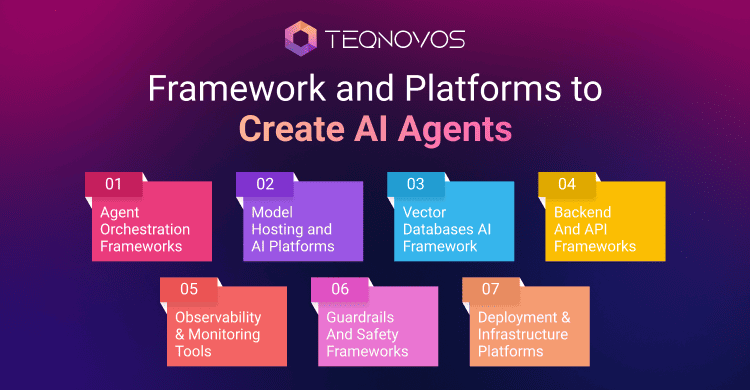
1. Agent Orchestration Frameworks
These frameworks help in structuring how agents think, interact, and act with different tools. They are like the backbone of complex systems and are important for scaling.
LangChain
It is one of the most widely used platforms for creating LLM-based agents.
Developers use it for:
- Tool integration
- Prompt chaining
- Basic agent workflows
- RAG pipelines
Strengths:
- Huge ecosystem
- Fast prototyping
- Strong community support
Limitations:
- It can become complex during production
- Debugging can be hard
Developers can often begin with LangChain, but later customize heavily for stability in production.
LIamaIndex
Focused on data ingestion and retrieval, augmented generation.
What developers use it for:
- Document indexing
- Vector search pipelines
- Data connectors
Strengths:
- Excellent for RAG
- Easy integration with vector databases
Limitations:
- Not a full orchestration system
- Often paired with LangChain or custom orchestration layers.
AutoGen
Designed for multi-agent collaboration.
What developers use it for:
- Multi-agent workflows
- Role-based agent systems
- Complex reasoning chains
Strengths:
- Powerful for advanced use cases
- Supports agent conversations
Limitations:
- Hard to control in production
- Risk of unpredictable loops
Developers use it cautiously for autonomous AI agents, often with strict guardrails.
CrewAI
A newer framework focused on team-like agent collaboration.
What developers use it for:
- Task delegation between agents
- Role-based execution (researcher, writer, etc.)
Strengths:
- Intuitive design
- Good for structured workflows
Limitations:
- Still evolving
- Limited production tooling
2. Model Hosting and AI Platforms
These platforms provide access to powerful LLMs and the infrastructure needed for scaling.
OpenAI Platform
What developers use it for:
- High-quality LLM APIs
- Function calling
- Embeddings
Strengths:
- Reliable and scalable
- Strong performance
Common choice for production-grade AI agent in production systems.
Hugging Face
What developers use it for:
- Open-source models
- Model hosting
- Fine-tuning
Strengths:
- Flexibility
- Open ecosystem
Ideal for teams that want more control or lower costs.
Google Cloud AI
What developers use it for:
- Vertex AI
- Model deployment
- Scalable infrastructure
Strong choice for enterprise-grade deployments.
Microsoft Azure AI
What developers use it for:
- Enterprise AI solutions
- Integration with business systems
Often used in large organizations to build secure AI systems.
3. Vector Databases (For RAG Systems)
Vector databases are essential for retrieval augmented generation.
Pinecone
What developers use it for:
- Fast semantic search
- Scalable vector storage
Fully managed and production-ready.
Weaviate
What developers use it for:
- Hybrid search
- Knowledge graphs
Good balance between flexibility and performance.
FAISS
What developers use it for:
- Local vector search
- High-performance similarity search
Often used in custom pipelines.
Chroma
What developers use it for:
- Lightweight RAG systems
- Prototyping
4. Backend & API Frameworks
AI agents still need traditional backend systems.
FastAPI
What developers use it for:
- Building APIs
- Serving AI agents
Lightweight and fast, very popular for AI systems.
Node.js
What developers use it for:
- Real-time applications
- Event-driven systems
Django
What developers use it for:
- Full-stack backend systems
- Admin dashboards
5. Observability and Monitoring Tools
Production systems require deep visibility.
LangSmith
What developers use it for:
- Debugging agent flows
- Tracing executions
Weights & Biases
What developers use it for:
- Experiment tracking
- Model evaluation
Helicone
What developers use it for:
- Logging LLM usage
- Cost tracking
6. Guardrails and Safety Frameworks
To ensure safe and reliable behavior, developers implement guardrails for AI agents.
Guardrails AI
What developers use it for:
- Output validation
- Structured responses
Rebuff
What developers use it for:
- Detecting malicious inputs
- Preventing prompt injection
Microsoft Presidio
What developers use it for:
- PII detection
- Data anonymization
7. Deployment and Infrastructure Platforms
Once the agent is ready, it needs to be deployed reliably.
Docker
What developers use it for:
- Packaging applications
- Ensuring consistency across environments
Kubernetes
What developers use it for:
- Scaling applications
- Managing clusters
AWS
What developers use it for:
- Hosting AI systems
- Scalable infrastructure
How Developers Choose the Right Stack?
There is no single “best” stack for building LLM-based agents. Developers choose based on:
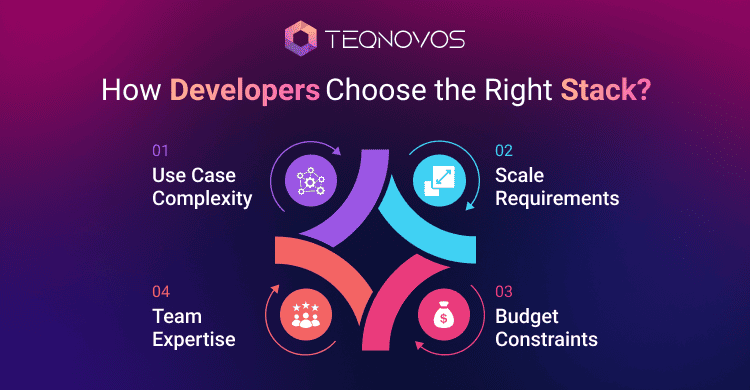
1. Use Case Complexity
- Simple chatbot → minimal stack
- Enterprise agent → full orchestration + monitoring
2. Scale Requirements
- Low traffic → lightweight tools
- High traffic → scalable cloud infrastructure
3. Budget Constraints
- Open-source tools reduce cost
- Managed services improve reliability
4. Team Expertise
- Python teams → FastAPI, LangChain
- JS teams → Node. js-based solutions
A Typical Production Stack Example
A real-world AI agent in production might look like:
- LLM: OpenAI API
- Orchestration: LangChain
- RAG: LlamaIndex + Pinecone
- Backend: FastAPI
- Monitoring: LangSmith
- Deployment: Docker + AWS
This modular approach allows flexibility and scalability.
Conclusion
Frameworks or platforms don’t build great agents; developers do. The best teams use frameworks as building blocks, customize heavily for production, and avoid over-dependency on a single tool.
When creating autonomous AI agents, the objective is not to use most tools, but to use the right ones effectively. A well-chosen stack can dramatically shorten the journey from a prototype to a trustworthy AI agent in production.