Top 10 AI Workflow Automation Tools for Businesses
A few years back, AI tools used to feel like a simple chat interface. Users used to ask questions, and the bot replied. Some people still remember this as a tool that used to answer queries. Those early systems created curiosity, but the impact felt limited.
Well, the dynamics have changed now. With ChatGPT and generative AI development entering the market, public interest has increased. New tools appeared across marketing operations and product development. Businesses began to see how AI could support everyday work.
Soon, AI moved from simple conversations to interactions with real business tools. This shift introduced a new concept called AI workflow automation. This allows software systems to run tasks and processes with minimal human intervention.
Businesses explore these tools to improve productivity and operational efficiency. Some platforms offer robust automation capabilities and advanced integrations.
This article explores the top AI workflow automation software and tools for businesses. Each platform offers unique AI workflow software development services for automation and process management. The goal is to help businesses discover tools to create real functional impact and support smarter digital workflows.
Bridge the gap between tools and transformation with custom AI workflow automation built for long-term growth. Get started now.
Schedule a CallWhy Businesses Are Adopting AI Workflow Automation
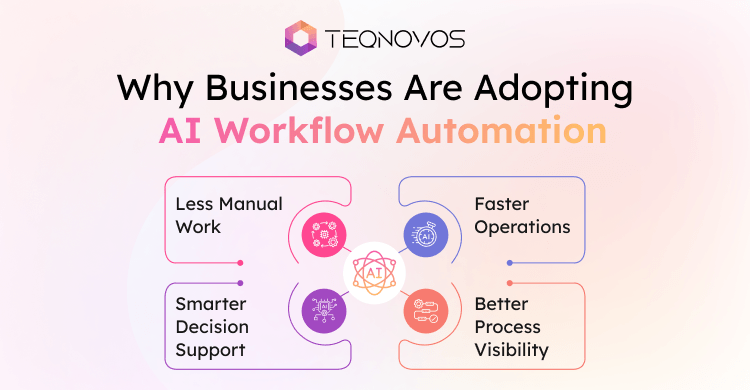
Organizations manage many digital systems. Teams handle data requests and approvals across different tools. This increases operational complexity. AI workflow automation helps businesses simplify these processes.
-
Less Manual Work
Automation systems perform repetitive tasks automatically. This allows development teams to spend more time on strategic work.
-
Faster Operations
Workflows move data between applications in real time. Processes that once took hours now take minutes.
-
Smarter Decision Support
Artificial Intelligence analyzes information and suggests actions. This helps teams respond quickly to operational needs.
-
Better Process Visibility
Automation platforms track tasks across departments. Leaders gain better visibility into workflows and performance.
Businesses looking for a deeper understanding of the tech can explore our detailed guide on AI workflow automation development.
Top 10 AI Workflow Automation Tools
Businesses rely on digital tools to handle business operations. Teams use separate platforms for marketing support and internal processes. Managing work across these systems slows productivity.
The following tools are the most widely used workflow automation platforms for businesses today. Each offers unique features to help streamline processes and improve operational efficiency.
1. Zapier
Overview
The most widely used workflow automation platforms. It connects thousands of applications and allows teams to automate repetitive tasks. Businesses use Zapier to move data between tools and trigger actions. This makes everyday operations faster and more organized.
Key Features
- Connects more than five thousand business applications
- Visual workflow builder for automation setup
- Supports multi-step automation workflows
- AI assistance for workflow suggestions
- Real-time triggers and task automation
Pros
- Easy platform for beginners and business teams
- Large integration library across many industries
- No coding required for most workflows
Cons
- Advanced workflows may require higher pricing plans
- Complex automation may feel limited for developers
Best For
Small businesses, startups, and marketing teams looking for simple workflow automation without technical complexity.
2. Make
Overview
A powerful workflow optimization platforms to assist businesses in connecting applications and automating processes. This tool was previously known as Integromat. Make provides a visual interface where users design workflows and automate tasks across multiple systems. Many businesses use this platform to manage complex operations and data movement between tools.
Key Features
- Visual workflow builder with automation design
- Supports multi-step automation across many applications
- Advanced data processing and conditional workflow logic
- Real-time execution and task monitoring
- Large library of application integrations
Pros
- Flexible platform for building advanced workflows
- Strong visual interface that shows workflow structure
- Supports complex automation scenarios
Cons
- Learning curve for new users
- Advanced workflows may require technical understanding
Best For
Growing businesses and technical teams that want deeper control over workflow automation and multi-step process management.
3. Teqnovos
Overview
A software development company that builds custom automation platforms for modern businesses. Many automation tools help teams connect applications and manage routine workflows. However, organizations with complex systems often require deeper customization and advanced integration capabilities. Teqnovos focuses on building intelligent automation solutions to support business workflows and digital operations.
The company develops conversational automation systems to connect AI fintech voice assistant development for automated customer interactions and intelligent service systems.
Key Capabilities
- Custom AI workflow automation development
- Integration with enterprise software platforms
- Automation architecture for scalable digital systems
- Development of intelligent platforms and applications
- Automation solutions for industries such as fintech and enterprise services
Pros
- Custom solutions designed around business processes
- Flexible architecture for complex workflow automation
- Experience with modern Artificial Intelligence technologies
Best For
Organizations that require tailored automation systems and businesses that want to build scalable AI-powered workflow platforms for digital growth.
4. n8n
Overview
An open source workflow automation platform designed for teams looking for control over automation systems. This allows users to build workflows to connect different applications and services. Developers prefer n8n because it supports self-hosted environments and flexible customization. Organizations design automation processes to match specific functional needs.
Key Features
- Open source automation platform with self-hosting support
- Visual workflow editor for building automation logic
- Supports custom scripts and API integrations
- Large collection of automation nodes for applications
- Flexible workflow triggers and task execution
Pros
- High-level control for developers and technical teams
- Self-hosted option improves data ownership
- Supports complex integrations and automation logic
Cons
- Setup may require technical expertise
- The interface may feel complex for beginners
Best For
Developers and technology teams that want customizable automation with full control over workflow infrastructure.
5. UiPath
Overview
A leading automation platform used by enterprises across many industries. This tool focuses on robotic process automation. It allows software robots to perform routine digital tasks that humans usually handle. Organizations use UiPath to automate data processing and internal business operations at scale.
Key Features
- Robotic process automation platform for enterprise workflows
- AI-powered document understanding capabilities
- Visual automation designer for building process flows
- Automation bots that handle repetitive digital tasks
- Strong security and governance controls
Pros
- Powerful automation platform for large organizations
- Supports complex operational workflows
- Strong analytics and monitoring capabilities
Cons
- The platform may require training for effective use
- Pricing can be high for smaller companies
Best For
Large enterprises and operations teams need scalable automation for high-volume business processes.
6. Microsoft Power Automate
Overview
A workflow automation platform within the Microsoft ecosystem. Assist organizations automate processes across Microsoft applications and third-party tools. Teams use Power Automate to streamline and manage data updates. It triggers actions across connected services. Many companies choose this platform because it integrates naturally with Microsoft products such as Office and Dynamics.
Key Features
- Native integration with Microsoft Office and Dynamics tools
- Visual interface for creating automation workflows
- AI-powered process automation capabilities
- Supports cloud workflows and desktop automation
- Secure automation environment for enterprise systems
Pros
- Strong integration with Microsoft business applications
- Suitable for both simple and advanced workflows
- Reliable platform for enterprise operations
Cons
- Best experience requires Microsoft ecosystem tools
- Advanced automation may require technical knowledge
Best For
Organizations that rely on Microsoft platforms and want automation tools that integrate smoothly with their existing business systems.
7. Automation Anywhere
Overview
Handle large-scale business processes with this platform designed for enterprise automation. It combines RPA with AI capabilities. Organizations use this to automate tasks such as data extraction and operational workflows. Many industries adopt this platform to increase efficiency and reduce manual workload across departments.
Key Features
- Enterprise-grade robotic process automation platform
- AI document processing and data extraction
- Cloud automation environment
- Workflow analytics and performance monitoring
- Secure automation management for large organizations
Pros
- Powerful platform for enterprise process automation
- Supports large volume operational workflows
- Strong security and governance capabilities
Cons
- Implementation may require technical expertise
- Higher cost for smaller organizations
Best For
Large enterprises and operations teams that require scalable automation for complex business processes.
8. Tray.io
Overview
Designed for organizations looking for strong integration capabilities. Businesses use it to connect applications and build automated workflows across systems. Many companies use this platform to manage data synchronization and internal processes. It supports complex automation to help businesses streamline operations at scale.
Key Features
- Visual workflow builder for integration and automation
- Supports API based connections with business applications
- Advanced data processing and workflow logic
- Real-time workflow execution and monitoring
- Integration support for many enterprise platforms
Pros
- Strong platform for complex system integrations
- Flexible workflow design for business operations
- Reliable performance for high-volume automation
Cons
- Setup may require technical understanding
- Pricing may be higher for smaller teams
Best For
Growing businesses and technology teams that need powerful integrations and advanced workflow automation across multiple systems.
9. Activepieces
Overview
Modern automation platform built for teams. Offers a flexible workflow automation with open technology. It allows users to connect applications and automate tasks using a visual workflow interface. It supports open source development and customizable automation systems. This flexibility helps businesses design workflows to match their operational needs.
Key Features
- Open source automation platform for flexible workflow creation
- Visual builder that simplifies automation design
- Large library of integrations for business applications
- Custom automation steps for specialized workflows
- Secure environment for managing automated processes
Pros
- Open technology allows customization and flexibility
- Simple interface for building automation workflows
- Growing ecosystem of integrations
Cons
- Smaller integration library compared to older platforms
- Some advanced features are still evolving
Best For
Teams and developers that want customizable workflow automation with open technology and flexible deployment options.
10. Pabbly Connect
Overview
Allows businesses to connect applications and automate everyday tasks. This tool enables teams to create workflows to transfer data between different software tools without manual effort. Many small and growing businesses choose this platform because it offers simple automation features and cost-effective pricing.
Key Features
- Connects many business applications for workflow automation
- Visual builder that helps users design automation processes
- Supports multi-step workflows across different platforms
- Real-time data transfer between connected tools
- Automation triggers that run tasks automatically
Pros
- Simple platform for creating automation workflows
- Affordable pricing for small teams and startups
- Supports many business application integrations
Cons
- Interface may feel basic for advanced users
- Limited advanced automation compared to enterprise platforms
Best For
Small businesses and startups that want an affordable automation platform to connect applications and manage everyday workflows.
Turn insights into action with a powerful AI workflow automation platform built for growth Connect with our team to get started.
Schedule a CallHow to Choose the Right AI Workflow Automation Tool
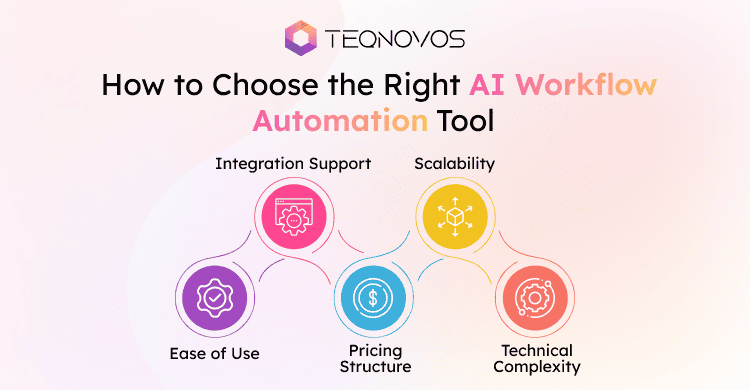
Choosing the right automation platform requires careful evaluation. Every business manages different processes and technology environments. A tool that works well for one organization may not fit another operational structure.
1. Ease of Use
Some platforms offer simple visual interfaces to help teams build workflows. Tools with an intuitive design allow non-technical users to automate tasks without complex setup.
2. Integration Support
Automation tools must connect with existing business applications. Companies should evaluate how easily the platform integrates with CRM systems and various data tools.
3. Scalability
Businesses should choose platforms that support growth. As operations expand, workflows become more complex. The automation system should handle larger data volumes and additional processes.
4. Pricing Structure
Automation platforms offer different pricing models. Some tools charge based on tasks. Others offer subscription plans with advanced features. Organizations should select solutions that align with their budget and usage needs.
5. Technical Complexity
Some platforms are designed for developers. Others focus on simple automation for business teams. Companies should evaluate the technical knowledge required to build and maintain workflows.
Why Businesses Need Custom AI Workflow Automation
Many organizations begin with automation tools to manage routine workflows. These platforms help teams connect applications and automate simple processes. They work well for common use cases such as data transfer notifications and basic task management.
As operations grow, workflows become more complex. Businesses start working with multiple systems and advanced process requirements. Standard tools may not support deep integrations or custom logic across platforms.
In such situations, companies require tailored solutions. Custom automation systems allow organizations to design workflows to match their operations. These systems integrate directly with internal platforms and support advanced data processing.
Teqnovos helps businesses build custom AI workflow solutions. The team develops intelligent automation platforms to connect enterprise tools and manage workflows at scale. Explore our software development services to build automation solutions to align with business goals.
Businesses wanting to extend automation into digital products also benefit from mobile app development services. These solutions enable real-time workflow management and improve user experience across applications.
Custom AI workflow automation helps organizations move beyond basic tools and build scalable systems that support digital growth.
Conclusion
AI workflow automation is becoming essential for modern businesses. Organizations now rely on automation to manage operations and reduce manual effort. These tools help teams improve productivity and streamline workflows across systems.
The above mentioned top 10 AI workflow automation software provide businesses with flexibility and efficiency for different use cases. Support your complex workflows with automation and enhance business productivity.
Connect with Teqnovos to use the power of AI. Book a free consultation call with us today!